Email to quote · MJF 3D printing

Turn RFQ emails into MJF 3D printing quotes automatically

With Email to Quote, you forward an RFQ email with its attachments to your quote inbox and SeekMake creates a draft quote for you to review. Your team checks the price and sends it instead of building it from scratch.

Purchasing teams often send MJF requests as an email with several 3MF or STL files and a line like “PA12, dyed black, 200 of each”. Opening each file, measuring it and typing a quote takes time before any part is printed. Forwarding that email creates a draft quote for review, and your estimator checks the material, finish and quantities before sending it.

Watch the demo
Free planFree setup callYour logo, your domain
yourshop.com/instant-quote
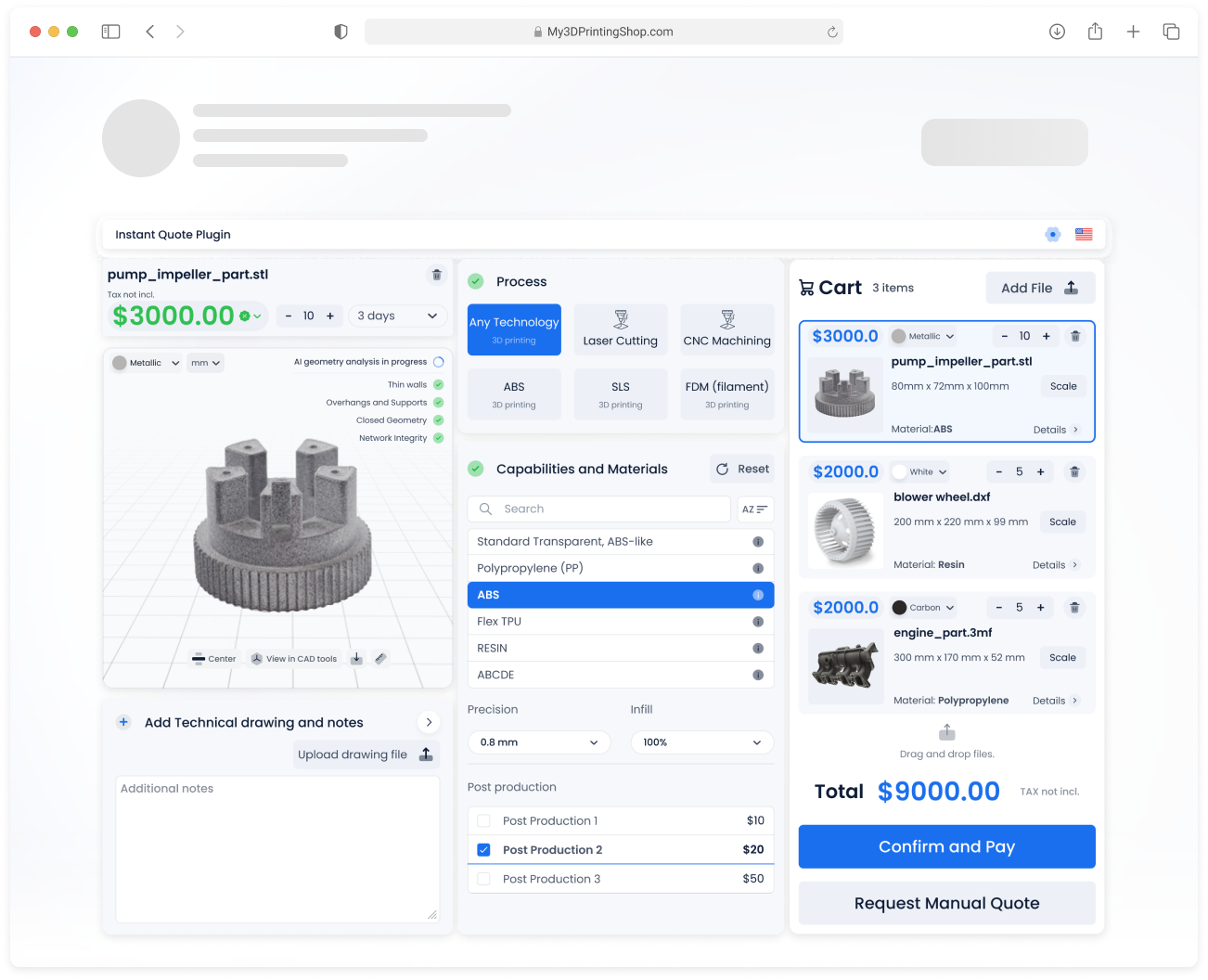
SeekMake instant quote widget: a part being analysed and priced, with material options and a cart
Key factsLast updated
Built for
Multi Jet Fusion 3D printing services
Customers upload
STL, OBJ and 3MF
Price follows
Your rates, setup and margins
Input
An RFQ email with attached files
Output
A draft quote to review
Your role
Check and send
The problem

RFQs still arrive by email

Email RFQs todaycopy, paste, price

  • Download every attachment
  • Open each file and measure it
  • Type the quote line by line
  • Send it back days later

Email to Quotedraft ready to review

  • Forward the email to your quote inbox
  • Files are read and priced with your rules
  • A draft quote appears in your dashboard
  • Review, adjust and send
Demo

See SeekMake in action

Watch a customer upload files, get prices and check out, then see the order arrive in the shop’s dashboard.
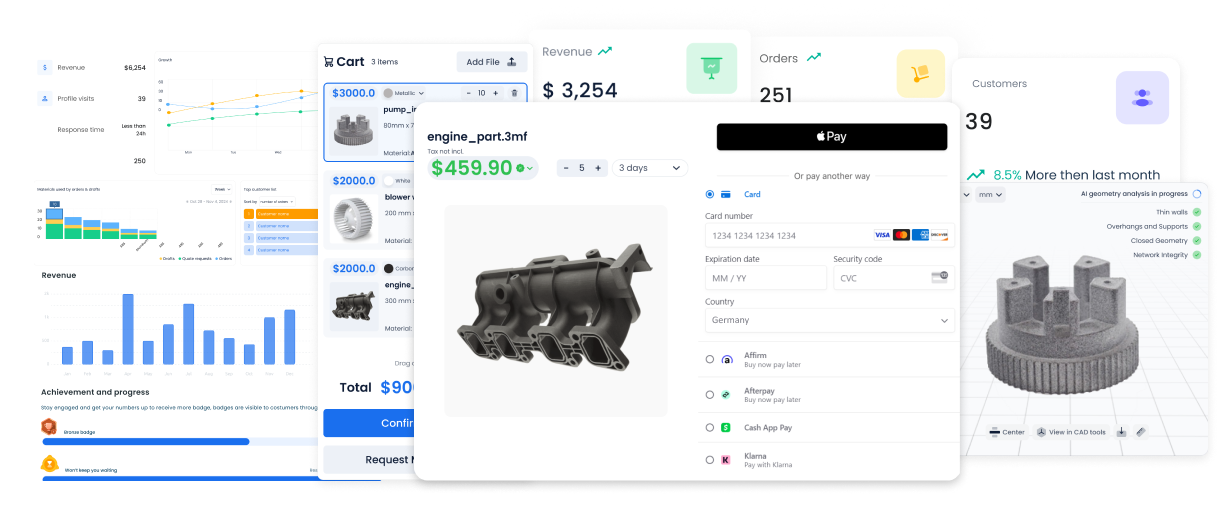
SeekMake demo video: upload files, see prices and check out
How it works

From inbox to draft quote

Customers who prefer email keep emailing. Your team stops retyping.
  • 01
    ForwardSend the RFQ email to your SeekMake quote inbox.
  • 02
    DraftA draft quote is created from the attached files.
  • 03
    SendReview the price, adjust it and send it to the customer.
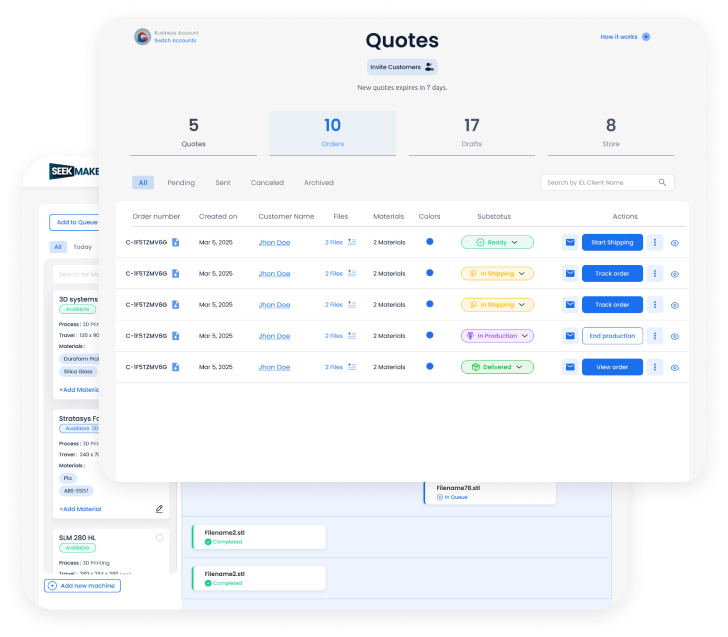
app.seekmake.com/quoting-emails
Quote list in the SeekMake dashboard
Fully customizable

A quote widget that looks and works like your website

Choose what customers fill in and what they can pick, then style it to match your site. Your customers never see the SeekMake name.

  • Input fields
  • Options customers can pick
  • Post-processing
  • Finishes
  • Certifications
  • Colours
  • Layout
  • Design and fonts
100% white labelYour logo, your colours and your domain on the widget, the customer portal, emails, quotes and invoices.
ColourLayoutCorners
Your shopduct_adapter.stl
Ready to price4/4
  • Watertight mesh
  • Wall thickness
  • Trapped powder
  • Fits build volume
Technology
MJF
Material
PA12
Colour
Grey (natural)
Post-processing
Dyed black
Certification
Certificate of conformity
Quantity: 100
€690.00
Ships in 5 working days
Add to cart
Request manual quote
Example widget. Prices are illustrative.
Your pricing rules

Price MJF 3D printing the way your team does

These are the inputs you control. Example values are for illustration only.

VolumePart volumeMaterial used, from the model's volume in cm³
MaterialPowderPA12, PA11 or TPU, each with its price
BoxBounding boxBuild space the part takes, for nesting in the build unit
PackPacking densityHow many parts you expect per build
FinishFinishingBead blasting, dyeing or vapour smoothing
StartStart-up costA fixed charge per order or per part
BreaksVolume pricingLower prices for larger orders
Customer portal

Customers track every quote and order themselves

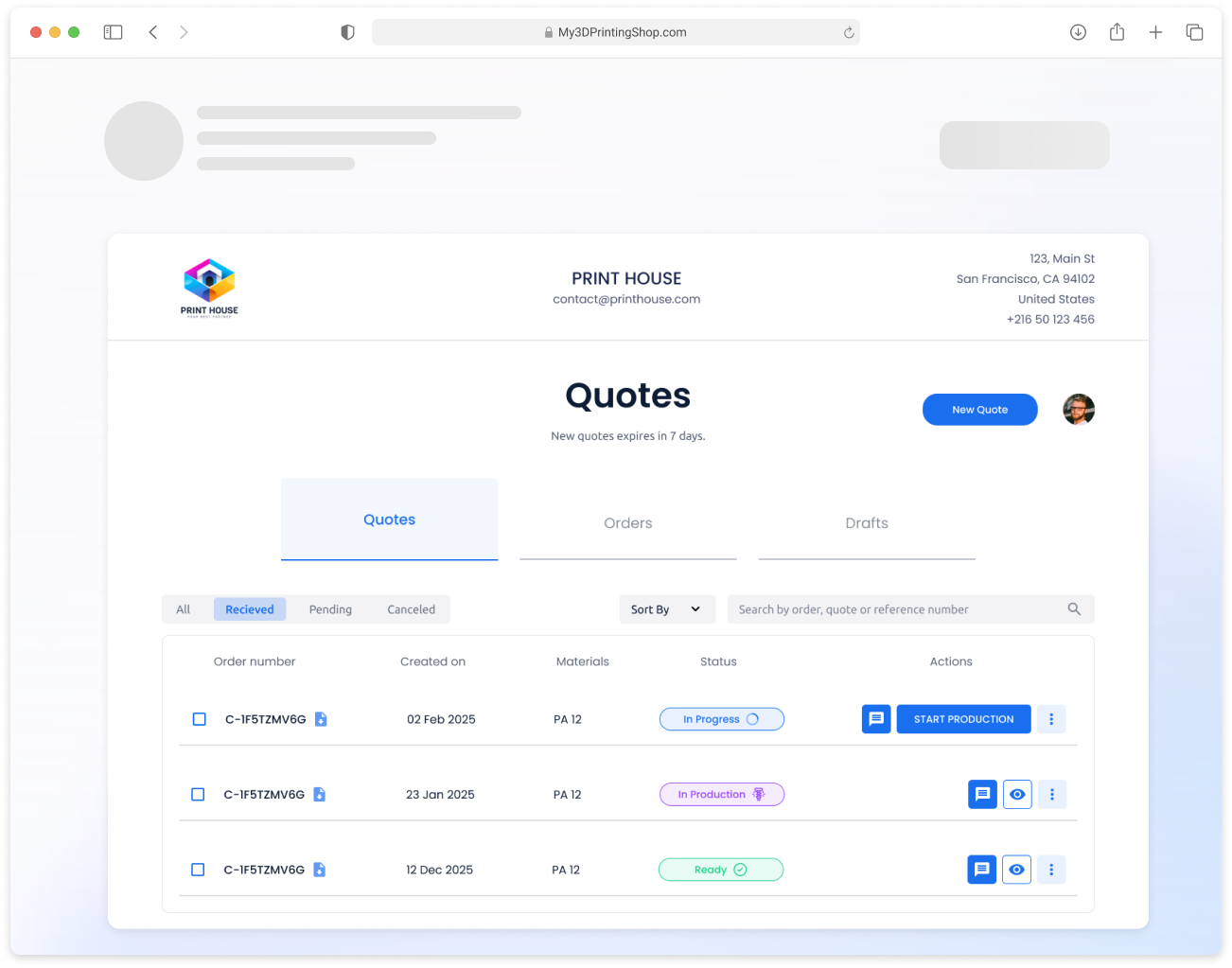
Each customer gets a portal on your domain with their quotes, orders, invoices and messages, so they stop emailing you for status updates.
  • 01
    Quotes saved automaticallyEvery upload becomes a quote the customer can reopen, edit and order later.
  • 02
    Order status and chatProduction status and a message thread on each order.
  • 03
    Invoices and receiptsDocuments generated from the order, in your branding.
portal.yourshop.com/quotes
Customer portal listing quotes and their status
Grow your sales

Features that help you win more orders

Instant prices bring the requests in. These features turn more of them into paid orders.

Automatic follow-ups

Customers who didn’t order get reminder emails on the schedule you choose.

See who viewed the quote

Know when a customer opens a quote, so you follow up at the right moment.

Customer portal

Customers reopen quotes, reorder and track production without emailing you.

File repair

Broken meshes are fixed automatically, so fewer quotes stall on a bad file.

Email to quote

Forward an RFQ email and a draft quote is created for you to review.

Discounts and coupons

Offers for new customers, repeat buyers or large orders.

And more: order tracking, analytics, custom emails and online payments.

Not sure it fits your shop?Book a discovery call. We look at your process, your pricing and your website together.
Comparison

Manual RFQ handling vs Email to Quote

ComparisonManual handlingSeekMake
AttachmentsDownloaded one by oneRead automatically
PricingCalculated by handYour rules applied
Quote creationTyped line by lineDraft created for you
Time to respondHours or daysMinutes
Quote historyIn emailSaved in your dashboard
Time saved

What instant quoting saves your shop

Hours saved per month
19 h
Cost saved per month
€779

Assumes about 1 minute to review each automatic quote and 4.33 weeks per month. Change the sliders to match your shop.
Back office

Everything after the order, in the same place

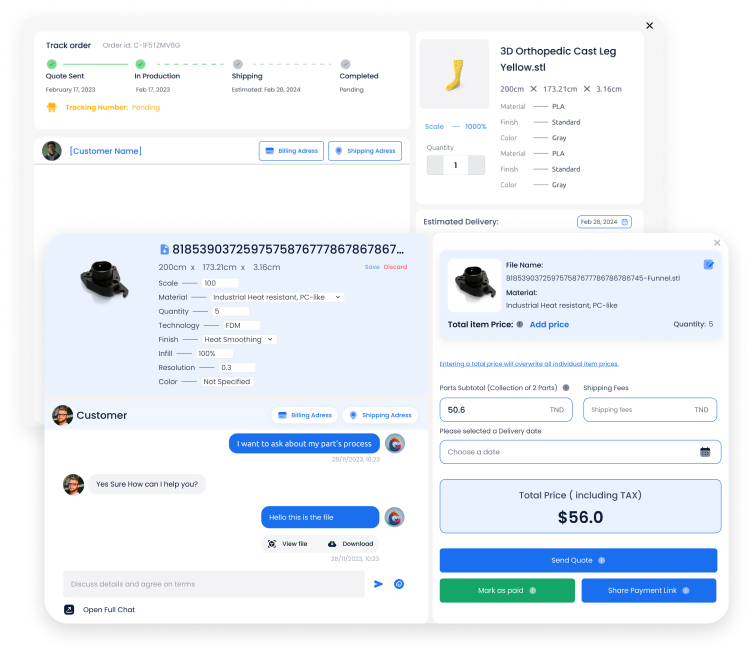
Order page with production status and customer chat

Orders and customer chat

Each order carries its files, price breakdown, delivery date and a thread with the customer.
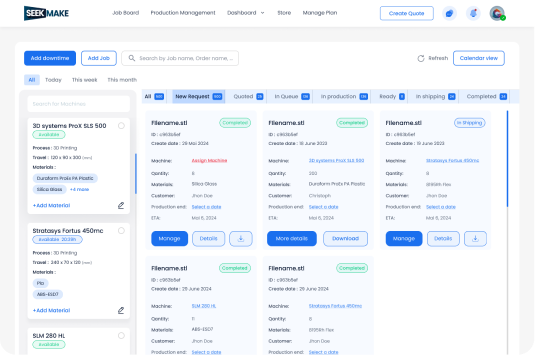
Production board with jobs grouped by status

Production board

Jobs move from quote to production to shipping, grouped by status and machine.
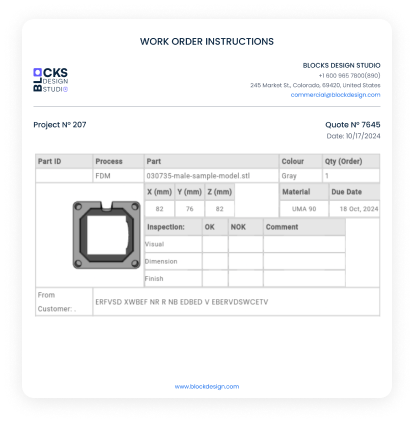
Printable work order instructions

Work orders

Printable instructions with part, material, quantity and inspection fields.

Analytics with revenue, orders and visitors

Reports

Revenue, orders, quote-to-order rate and visitors in one view.

CustomersDiscounts and couponsShipping rulesMachinesMaterialsCustom emailsJob queuePayments: card, PayPal, bank transfer
Integrations

Works with the tools you already use

Integrations: Google Drive, QuickBooks, Trello, Google Sheets, WordPress, Shopify
FAQ

Questions shops ask before switching

Do my customers need to change anything?

No. They keep emailing RFQs. You forward them to your quote inbox.

Is the draft sent automatically?

No. The draft waits in your dashboard so you can check and adjust it before sending.

Which files can be attached?

The same STL, OBJ and 3MF files your website widget accepts.

Can the draft include a certificate of conformity the buyer asked for?

Your estimator reviews the draft and can add lines, such as a certificate of conformity, before the quote goes out.

What if the buyer asks for a powder I don't run?

You can edit the draft before sending, for example switching the material to PA12 or PA11 and adding a note to explain the change.

Which files can customers upload?

STL, OBJ and 3MF files. The print is checked and measured automatically when it is uploaded.

How much does SeekMake cost?

There is a free plan to start. Paid plans add more features, lower fees on online orders and priority support.

We have detected an issue
This might limit your use of SeekMake. To resolve it, you can:
  • Click "Clear Cache" (Note: This will log you out)
  • Contact Us for further assistance